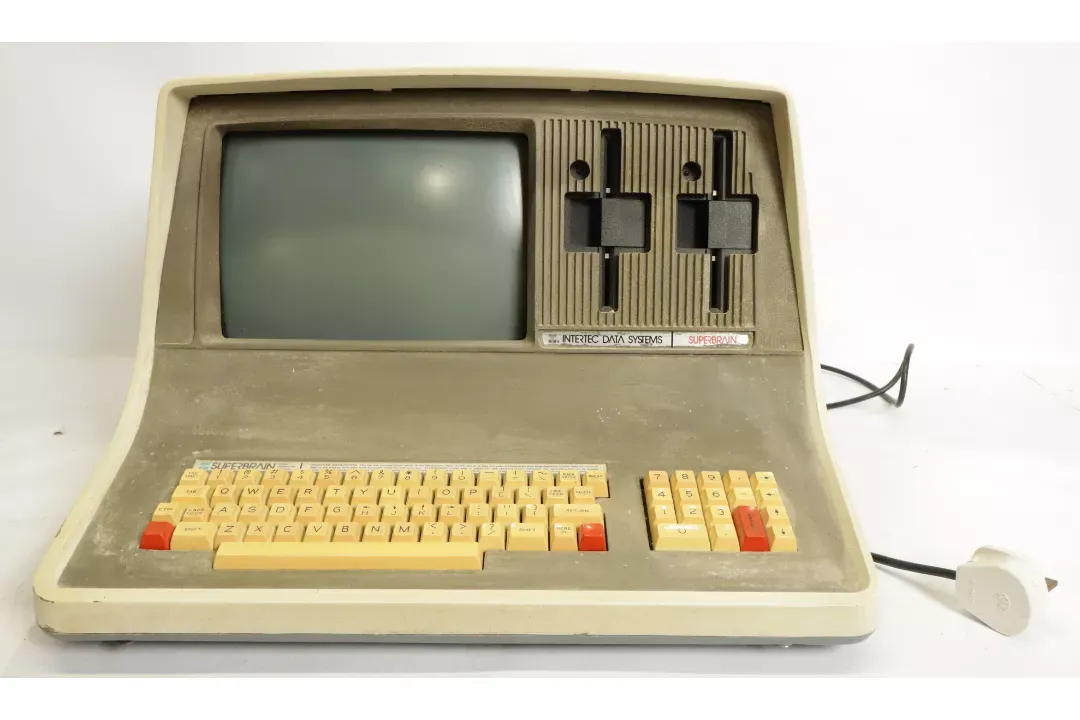
A new machine joined the collection in September 2026: an Intertec Data Systems SuperBrain. It's a UK-plugged unit with the original keyboard, the twin 5.25" drives, and decades of dust and yellowing on its beige keycaps. It hasn't been powered up yet. That will have to wait until it has had a proper inspection.
// HISTORY
Intertec Data Systems was based in Columbia, South Carolina, and was best known for its video terminals. In 1979 it launched the SuperBrain, an all-in-one business microcomputer that put the CPU, display, keyboard and two floppy drives into a single moulded case. It sold for roughly $3,000. That was a lot of money, but much less than a minicomputer setup, which made it a serious option for small offices that wanted to run CP/M.
The machine went through several revisions. These included the SuperBrain QD, whose quad-density drives roughly doubled disk capacity, and the later SuperBrain II. Intertec also sold models with an optional hard disk. By the mid-1980s the IBM PC and MS-DOS had overtaken CP/M, and the SuperBrain line faded along with it.
// SPECS
CPU ........ 2x Z80A @ ~4 MHz (main CPU + dedicated disk I/O)
RAM ........ 32K or 64K
DISPLAY .... 12" monochrome CRT, 80x24 text
STORAGE .... 2x 5.25" floppy drives (~170K each, standard model)
OS ......... CP/M 2.2
I/O ........ RS-232 serial ports, expansion bus
KEYBOARD ... integrated, with numeric keypad
// HOW IT WAS USED
The SuperBrain was built for office work. Because it ran standard CP/M, it could use the large CP/M software library from day one. Typical setups included WordStar for word processing, dBase II for databases, SuperCalc for spreadsheets, and a long list of accounting and payroll packages. The built-in numeric keypad was there for data entry.
The serial ports also meant it was often used as an intelligent terminal for larger systems. That made sense, since terminals were Intertec's main business. The all-in-one design was easy to set up, so the machine turned up in small businesses, schools and labs on both sides of the Atlantic.
// WHAT'S NEXT
Here's the plan before it gets switched on:
[ ] strip down and clean the case and keyboard
[ ] inspect the PSU and replace any suspect capacitors
[ ] power up on a variac and check the CRT
[ ] clean and test both floppy drives
[ ] boot CP/M 2.2
Progress updates will be posted here. For more vintage machines, see the hardware section.